
Appearance
What's new
Every release Paritor puts out has a note, and What's new is where you read them — newest first, with the latest one already open.
Where to find it: the notice after signing in, or About
The notice after you sign in
When a release has gone out since you last looked, a notice appears: "9 releases since you last looked, the latest 30 October 2026", or the title of the one release where there is only one, with Read what's new to open them.
It is counted per person rather than per version of the app: what matters is whether anything newer than you have read has changes for the app you are in.
Closing it keeps it closed for the day
Dismissing the notice with its × remembers that for the rest of the day, across every window. Opening a query result or a report in a new window will not bring it straight back — which is exactly what it used to do.
Opening the page is what marks them read. Closing the notice does not — which is why it comes back tomorrow if you dismissed it without looking, and stops of its own accord once you have.
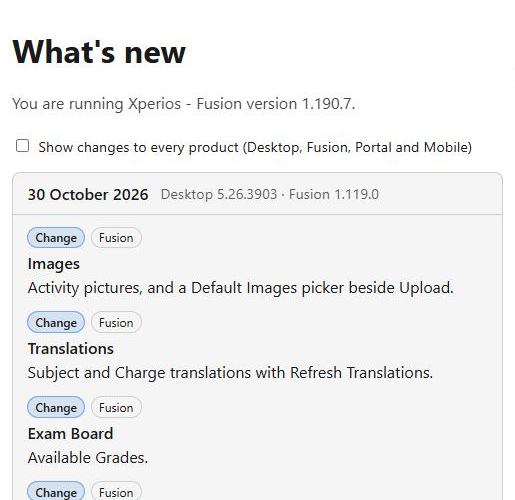
The top line tells you which version you are running, which saves asking when something does not look the way a note describes it.
What a release note contains
Each release is one note covering every Paritor product, with its date as the title and the version each product went to.
Inside, the changes are listed and each is labelled:
| Label | What it means |
|---|---|
| New | Something that was not there before |
| Change | Something that works differently now |
| Fix | Something that was wrong and is not any more |
Fixes come last, deliberately — people read a release note to find out what is new, not to audit the bug list.
What you see, and what you can see
By default you are shown the changes for the app you are in, plus the Portal — because the people who set the Portal up are usually the same people working in Xperios.
Tick Show changes to every product (Desktop, Fusion, Portal and Mobile) for the rest.
The desktop reads the same notes
Xperios Desktop no longer keeps release notes of its own. It opens this same page, told which app and version it is, so a desktop user sees the desktop changes. One set of notes now serves everything.
Writing them
Release notes are written on the Master database, under Tools > Release Notes, and only there — the server checks again on every save.
One note per release, named by its date, with each product's version and the changes tagged with the products they apply to.
There are no drafts, and nothing can be deleted
A note is written when a release goes out, so it is live the moment it is saved. A release that happened cannot be unhappened, so there is no delete either — which makes the save worth re-reading before you press it.
See also
- Issues — raising something with Paritor, which is the other half of the conversation
- Xperios Fusion — the product the notes are about