
Appearance
Activity
The vocabulary your activities are described with.
Service Types — the most important list in Xperios. A service type describes one thing your service sells or delivers, and almost everything else hangs off one: activities, applications, invoices, teacher pay, how many sessions get diarised, and what parents see on the Portal.
On a tuition service type, Hide lesson times from parents is where you record that parents should be given the day of a lesson without the time it starts. It is a choice per service type, so a service can hold the times back on the activities whose slot is not really fixed and leave them on the ones where it is. Nothing on your side changes either way — the time stays on the schedule, the register and the teacher's own diary.
The setting is saved, but nothing acts on it yet
You can tick this today and it will be remembered, but the parent Portal does not read it yet, so parents still see lesson times. That part is being built. Until it is live, treat this as recording what you want rather than changing what anyone sees.
Activity Groups — how the activities you offer are grouped. Set these up before the activities themselves.
Activities — everything you offer, each linked to an activity group and, where relevant, a resource group. Each carries its own list of Subjects, and two switches that decide what the register and the add-pupil forms offer: Requires Subjects makes a subject compulsory, and Has Subjects offers one without insisting on it. See Giving a pupil a subject.
Activity Cancel Reasons — why an activity was cancelled: threshold not met, venue no longer available.
Genre — classical, jazz, ballet. The position decides where each appears in a list, with 1 at the top.
Group Types — what kind of group a group is: orchestra, choir, brass band, ballet. Chosen on the group beside its genre, which is a different question — the type is what the group is, the genre is what it plays. See Group Types below.
Subjects — everything taught across your organisation. Xperios translates these into the languages you use.
Notes of Interest Areas — the forms people use to register an interest in something you are considering offering. What comes back helps you decide whether it is worth running.
Teacher Activity Types
What a teacher's time is recorded against, which is what their pay is calculated from.
Each type belongs to one of seven categories, and the category is what ties the record to the kind of work it describes:
Tuition, Group Member, Audition, Exam, Purchased, Allowance and Event activity.
A teacher activity type is chosen on a service type and on an activity group. That is the link that matters: it is why work delivered against an activity turns into a pay claim of the right kind without anybody classifying it by hand.
Allowance is the category that is not teaching
The other six describe delivering something. Allowance covers time that is paid but not taught — running an ensemble, holding a post — which is why allowances also appear on a teaching contract.
Exam Boards
The boards you enter pupils with, and what each one offers.
A board is not just a name. It holds three lists of its own:
| Grades | The grades the board awards |
| Subjects | Which of your subjects it examines |
| Centres | Where its exams are sat |
The grades are the part that gets used most widely. A grade is what a pupil is entered at on an exam session, what is recorded against them when the result comes back, and what an applicant is asked for at an audition — so the list is what everything downstream picks from.
Setting a board up with no grades is the usual reason an exam session cannot be created.
Available Grades
A board's Available Grades are the grades it awards, and its Subjects are what it offers them in. Together they are what an exam session can be set up against, so a grade missing here is a grade nobody can be entered for.
Assessments
How a pupil's progress is recorded against individual lessons.
Each assessment carries a code, a position that decides where it appears in the list, a Value, and — for English services — a Hub Return Standard.
Value is the one that does real work. It puts the levels in order and sets the size of the step between them, which is what lets progress be measured from term to term and year to year. Use 1, 2, 3, 4 for equal steps, or 1, 2, 4, 8 where each level is harder to reach than the last.
Three rules follow from that:
- Every live level needs its own value. Fusion will not save a value another live level already has, and neither will the API.
- A new level starts at the next free value, so adding one at the end needs no thought.
- 0 means "not a level" — Not Known and its like. A level at 0 is left out of progress, and any number of levels can sit at 0.
Hub Return Standard
Where your education system is English, each level also says which of the Arts Council's four attainment bands it represents, so Hub Return C9 — Standards Achieved can be produced without anybody re-classifying every pupil each year.
The bands follow the template: Entry (pre-level 1, initial or prep), Foundation (level 1, grades 1 to 3), Intermediate (level 2, grades 4 and 5) and Advanced (level 3, grade 6 and above). There is also Unknown, for a level that genuinely tells you nothing about attainment, and Not yet mapped for one nobody has decided about.
Go through your levels before your first return
Nothing was converted when this arrived. Your existing levels kept the numbers they already had, and those numbers are now read as bands — so a level that was holding a number for some other purpose may be reporting an attainment it never meant. The first time you run C9, expect most pupils to come back as not yet mapped or Unknown, and treat that as the job to do rather than the answer.
The one to look for is a level called Not Known, or similar. If it is sitting on Foundation it is telling the return that those pupils have reached grades 1 to 3, when the service meant it did not know. That belongs on Unknown, which is exactly what Unknown is for. Several services have one.
Like the group types' Hub Return Type, the question is asked only where your education system is English. Everywhere else the field is not shown and nothing reads it.
An assessment is recorded against a lesson, so progress accumulates as a history of what was assessed and when rather than a single current figure. See Assessment levels and progress for who sets a level and what the values are then measured into.
Pictures on what you offer
Activities, Groups, Events, Auditions, Exam Sessions, Service Types, Activity Sections and Resource Groups can each carry a picture, which is what the catalogue and the Portal show alongside them.
Beside Upload there is Default Images, a set Paritor provides. It is the quicker way to get something sensible on screen — pick one that fits rather than finding and sizing your own — and you can still upload your own at any point.
Group Types
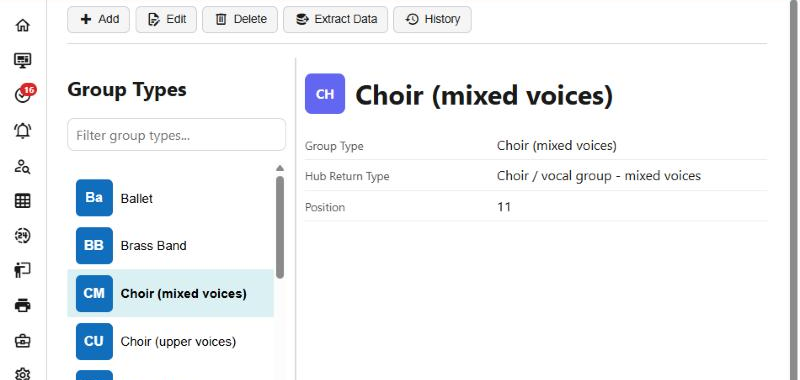
A group type has three things on it: its name, its position in the list (1 at the top), and — for English services — its Hub Return Type.
The field only appears on a group once you have some types, so a service that has not set any up will not see Group Type on its groups at all.
Hub Return Type
Each type says which row of the Arts Council England Music Hub return its groups count under, so the return can be produced without anybody classifying ensembles by hand each year. The choices follow the template: instrumental only, a choir or vocal group of upper voices, a choir or vocal group of mixed voices, a mixed ensemble, other, unknown ensemble, and not in the return.
"Not yet mapped" is a gap, not an answer
A new type starts as Not yet mapped, and the return shows those as a gap to chase rather than counting them anywhere. Unknown ensemble is different: it is the template’s own row for a group whose kind really is not known, and it has to be chosen deliberately.
The question is asked only where your education system is English, because the return is England’s. Everywhere else a group type is simply a name, and nothing reads the mapping.
Adapted Instruments or SEND Adjustments
On the group itself — not the group type — the Detail tab has a tick, Adapted Instruments or SEND Adjustments, shown for English services. It answers item C6 of the return: whether this group includes anyone using an adapted or adaptive instrument or piece of equipment, or whether you made adjustments so a young person with SEND could take part.
It is a record of what the service did, and it is never worked out from who is in the group. Leaving it unticked means no, or nobody has looked yet, and nothing can tell those two apart — so going through your groups is a job to do before a return rather than something the return can infer.
Translating names
Where your organisation has an AI key, Subjects and Charges have a Translations tab listing every language you work in but your own.
Refresh Translations fills them in from the name you have given. Read them before you rely on them: a subject name is often a word the translation will not know, and you can edit any line by hand afterwards.