
Appearance
Business Management
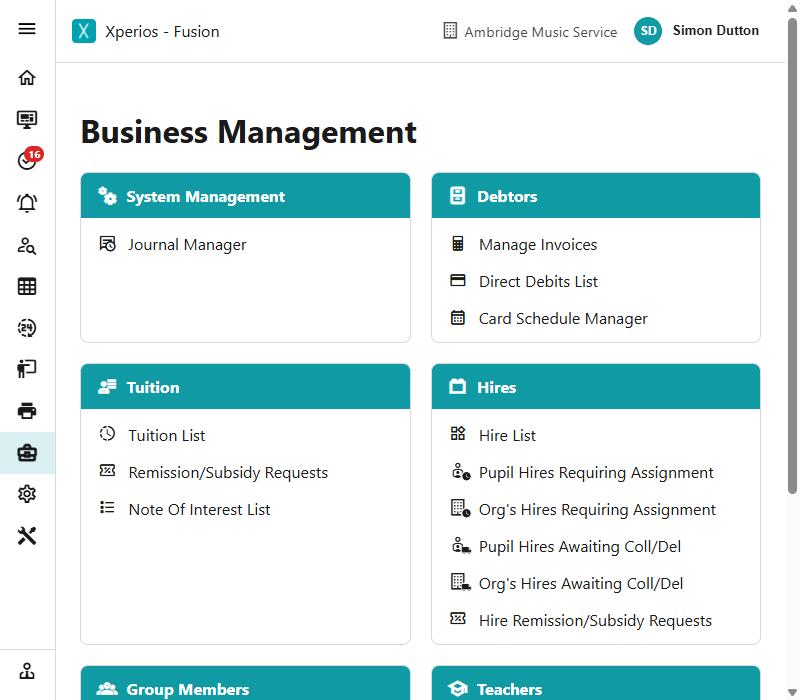
Business Management is where the running of the service is overseen rather than performed.
Everywhere else in Xperios you work on one record at a time — this pupil, that invoice. Here you see everything of a kind at once: every invoice outstanding, every hire waiting to be assigned, every pay claim waiting for approval.
That is what makes these the screens to go to when you want to know what has been missed.
What is here
| Invoicing | How and when an invoice is raised, and where the amount comes from |
| Debtors | Who owes you money and how they are paying |
| Payment emails | Payments another system emails you, turned into receipts |
| Tuition | Who is being taught, and what has been asked for |
| Hires | Instruments out on hire, at every stage |
| Group Members | Membership across the whole service |
| Coach routes | Transport to an activity, and the fare its passengers pay |
| Teachers | DBS, and pay waiting to be approved |
| Schools | The agreements you hold with schools |
| Journal Manager | Contact history across everybody |
| Business Report | A weekly email on how your service is doing |
Some jobs cut across all of them and have their own pages: Refunds for giving money back, Payment schedules for paying by instalments, The waiting list for everybody still waiting for a place, Progression for carrying pupils into the next academic year, Transfers for moving somebody between activities within one, and Finishing and withdrawing for when they stop.
Two pages cut across all of them: Actions on a pupil's activity, which is what every button on the toolbar does and whether the family is emailed, and Posting against an invoice, which is the same for the money.
They are lists, and they filter
Each is a filtered list. Narrow it to what you are dealing with, work through it, and the count comes down.
A list that never empties is worth noticing. Usually it means nobody has taken ownership of that queue rather than that the work is difficult.
The Note Of Interest List
People who have registered an interest in something you do not currently offer are held per area — the areas themselves are set up in Notes of Interest Areas. Pick an area and you get its notes, with Close Note, Email and SMS on them, and Show closed notes to bring back the ones already dealt with.
Export to Excel takes the list exactly as you are looking at it: the chosen area, in the order the grid is sorted, closed notes only if you have ticked to see them — and if you have ticked individual notes, only those.
It carries each person's details (name, whether they are registered, mobile, land line, email and address) and then one column per question on that area's form, with their answers. That last part is what makes it worth exporting: it is how you see at a glance what everybody waiting for a service actually asked for.
The file is named for the area and the date.