
Appearance
Issues
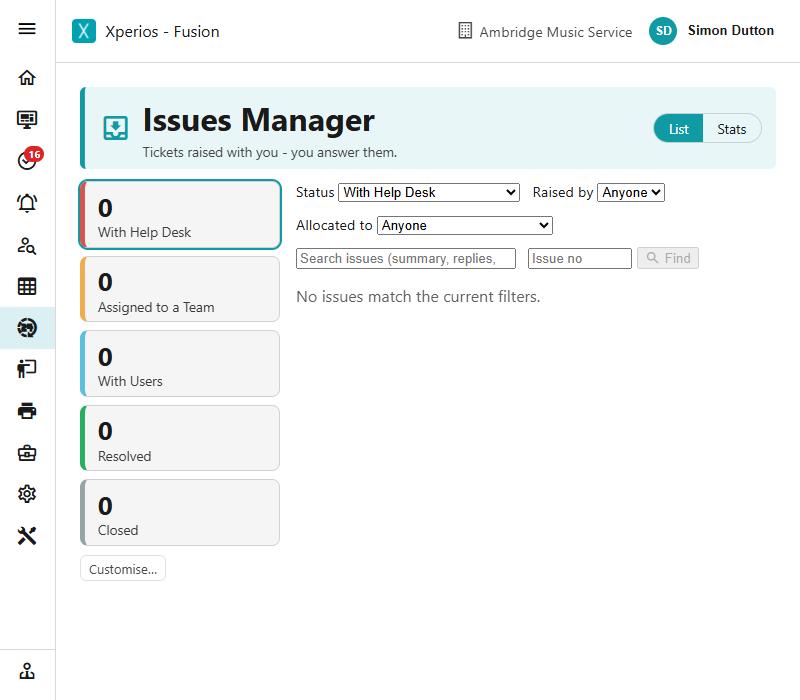
An issue is a support ticket — a question or problem somebody has raised that needs an answer.
Two sides of the same thing
Xperios has issues pointing in both directions, and the screen tells you which one you are on — each has its own icon, colour and line under the heading.
Issues Manager, on the Issue menu:
Tickets raised with you — you answer them.
Those come from your parents, pupils and schools through the Portal.
Assistance, at the foot of the side menu:
Your tickets with Paritor — Paritor answers them; you reply and close.
Same workspace and the same way of working, so everything below applies to both.
The workspace
The screen is in three parts: tiles across the top, a list of issues down the left, and whichever issue you have open on the right.
Status tiles
The tiles count the issues at each stage, and clicking one filters the list to it. They cover the stages an issue moves through:
With Help Desk · Assigned to a Team · Investigating · Resolving · Testing · Awaiting Release · Feature Requests · Requires Consultation · With Users · Resolved · Closed
You can choose which tiles to show, and the choice is remembered in your browser. Hide the ones that do not apply to how your service works.
The unread count
The Issues band carries a number: the issues that have changed since you last looked, across every stage.
It is marked read when you leave the workspace, not when you arrive — so everything that changed since your previous visit stays highlighted the whole time you are in there, and you can work through it without the highlighting disappearing under you.
Finding an issue
Above the list there is a status filter with the groupings people actually ask for — With User, With Support, Awaiting Software Release, Resolved, Closed, Feature Request and so on — plus All.
There is also a search box, and a filter for when the issue was created.
In this section
Setting it up
Issues are classified using four lists, set up in Settings:
- Issue Area — which part of the product an issue concerns
- Issue Classification — what kind of issue it is
- Issue Severity — how serious
- Issue Team — which team deals with it
They are maintained the same way as every other list — see Settings.
Rapport comes with every Xperios
Issues are part of Rapport, and every Xperios includes it — there is nothing to licence and nothing to switch on. Whether you see the menu entries depends on your user group and your rights.