
Appearance
Actions on a pupil's activity
Every tuition, hire, group membership, study place and event booking is an activity on a pupil, and the toolbar above the list is where they are moved along: offered, accepted, transferred, progressed, cancelled, restored.
This page is what each button actually does — and, because it is the question that matters most in an office, whether the family hears about it.
How the toolbar decides what to show
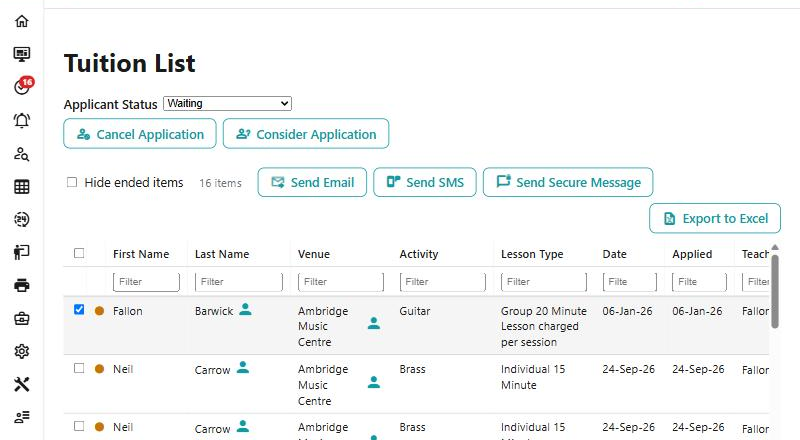
It works on the rows you have ticked, or on the selected row when you have ticked nothing. A few actions need exactly one row; Link Hire needs exactly two.
What is offered depends on two things about the row: what kind of activity it is, and what status it is at. A waiting tuition, above, offers two things and no more. A button you expected and cannot see is nearly always one of those two — a hire action on a membership, or an offer action on something already active.
The confirmation is the documentation
Every action that changes something says what it will do before it does it, in a sentence. Those sentences are the authority — this page collects them so you can read them before you are standing in front of the dialog.
And the toolbar is not the last word. The server checks the action again when you confirm it, and says why when it refuses.
What sends an email, and what does not
The actions that reach the family are few, and they are nearly all about a place being offered or taken:
| Action | What goes out |
|---|---|
| Make an Offer | The offer, with a link to accept it on the portal |
| Resend the Offer | The offer is made again from today, and the offer email goes again |
| Re-Invite from Waiting List | A place is offered and the invitation emailed |
| Publish Study Offer | A place on the study, emailed with a link to accept |
| Request Acceptance | The hire agreement, emailed again for acceptance on the portal |
| Reject Withdrawal Request | The refusal, with your reason — which is why a reason is required |
| Accept Member (a group) | The acceptance |
| Accept Hire | The acceptance |
Almost everything else is silent. Cancel Application, Revoke Offer, Restore, Progress, Cancel Progression, Cancel Transfer and Resolve Modification all say so in as many words: No email is sent.
That is worth knowing in both directions. A pupil cancelled by mistake has not been told, so putting it back costs nothing. But a place withdrawn with Revoke Offer has not been told either — if the family should know, that is a message you send yourself.
Offering and accepting
Make an Offer is for a direct tuition that is waiting with a plan already chosen, or an event booking. A group membership or a hire goes through the offer dialog instead, where the details are set first.
Accept Member is the shortcut for a group whose service type does not use the offer process — there is nothing to offer, so the place is simply taken. The member is accepted from the start date, put into the group's sessions from that date, and emailed. Whether an invoice is raised there and then, or left to the billing run, is the one thing that differs between services, and the dialog says which it will do.
Accept Hire is the same idea on a hire: no offer process, so it is accepted at once and the acceptance emailed, with the billing run invoicing it.
Two buttons called Accept Member, and only one is silent
On a study member being evaluated, Accept Member accepts them from today and sends nothing. On a group membership it emails the family. Same label, same icon, different consequence — so read the dialog rather than the button.
Revoke Offer withdraws an offer and puts the application back to waiting.
Collecting an instrument
Two buttons appear on a hire whose instrument has been assigned but not yet collected, and they are not opposites:
- Mark as Collected records it as collected today, and the hire shows Active.
- Not Collected - Back to Stock frees the instrument to assign again and leaves it where it is; the hire goes back on Requiring Assignment.
Back to Stock does not cancel the hire
The hire carries on — it is just waiting for an instrument again. If the hire is no longer wanted, cancel or terminate it as well. This is the one people get caught by: the instrument goes back, the hire quietly stays.
Carrying on into next year
Progress makes next year's record from the first day of the new academic year, on the same rate. A hire takes the resources still out across to it; a membership has its lessons put in. No email goes, and it is invoiced by next year's billing rather than now.
Cancel Progression is the reverse, and it is more than a deletion:
Next year's record is deleted with its lessons, and last year's finishes at the end of its year — the pupil is not carrying on. A hire's instrument goes back to last year's hire unless someone else has it now. A 1 to 1's teacher and venue sessions for next year stay.
That last clause is the one to read twice. The teacher's sessions are not removed, because the slot may be wanted for somebody else.
Undoing a transfer
Cancel Transfer puts a tuition back as it was before the transfer, with its lessons and the instruments it held, and cancels the one it was transferred to. It also unpicks the money: the transfer's credit and the new tuition's invoice are deleted and the payment schedule recalculated.
It refuses once money has moved
If either the credit or the new invoice has been paid or exported, the cancel is refused. At that point the transfer stands and the correction is a ledger job — see Posting against an invoice.
Putting something back
Restore handles both ways an activity can have stopped. A cancelled one goes back to the waiting list. One that has ended becomes active again with no finish date, and its lessons from the start are put back. No email, and no invoice is changed.
It is not offered on a tuition or membership that was transferred on — the record that matters is the one it became — nor on a linked hire whose tuition is no longer live.
Requests waiting on you
Resolve Modification marks a change request as dealt with: the activity goes back to Active and the request is cleared.
Resolve does not make the change
It only closes the request. If the family asked for something — a different lesson, a different day — make that change first, with Transfer or whatever it needs, and then resolve the request.
Consider Application, Return to Waiting List and Approve Remission/Subsidy work the same way: they move the row's status and clear what was waiting.
Reject Withdrawal Request is the exception on this page, and the reason it asks for is not for your records: "A reason is needed - it is sent to the payer." Write it as something the family will read, because they will. Reject Remission and Reject Subsidy also take a reason, but theirs is recorded in the notes rather than sent.
See also
- Transfers — moving somebody to a different activity, which Cancel Transfer undoes
- Progression — the run that creates next year's records in bulk
- Withdrawing — ending an activity properly
- Waiting List — where offers come from
- An instrument is stuck — assignment, collection and return, and the lists that show each
- A pupil did not progress into the new year — when Progress has not happened and should have