
Appearance
Queries
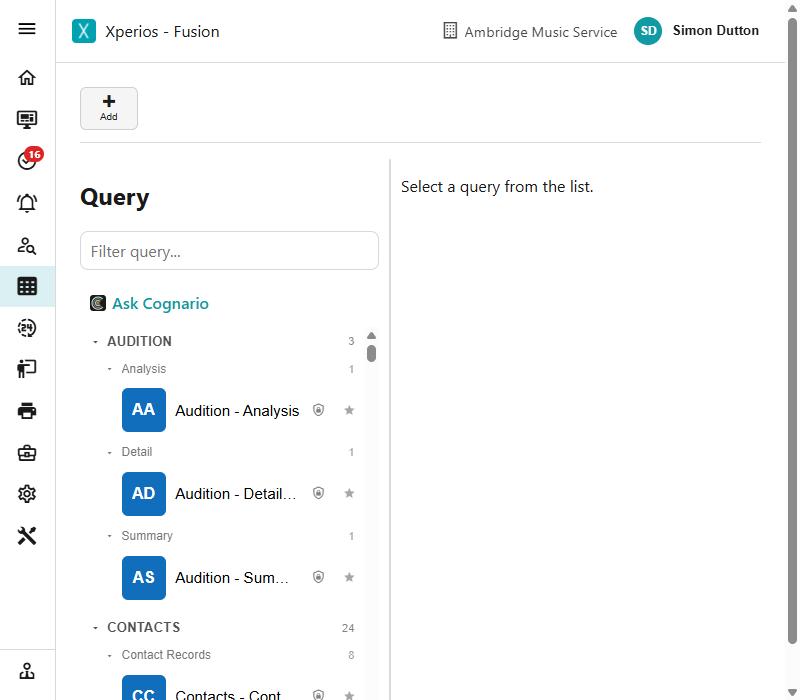
A Query is a saved, reusable question — usually written in SQL — that returns a set of rows. Queries behave like any other record in Xperios: you can list, add, edit, and delete them from the Query page, and search or filter the list by name.
Run opens the results in the current tab; Run In New Window opens them in a new browser tab, which is the easy way to compare two sets of parameter values side by side.
Archiving rather than deleting
Delete removes a query permanently. That is a problem if a Report or a Dashboard Item is still built on it, so for a query you have simply finished with, use Archive instead.
An archived query drops out of the list but is not destroyed, and anything depending on it keeps working. Restore brings it back. Neither asks for confirmation, because both can be undone — unlike Delete, which cannot.
Master queries
Some queries are Master queries — shared centrally and available to every organisation using Xperios. You can run a Master query and see its results like any other, but you can't edit it from your own database; it is locked (shown with a padlock icon) and can only be changed centrally.
Asking for a query you cannot see
New queries and reports are added centrally, to the Master set, and not in your own database — while the Master set is still being built up, nobody makes their own. So there is no Add on the query list outside Master, and no way to take a copy of a Master query and change it.
That means the answer to "the query I used to run isn't listed" and "I need a version of this with one more column" is the same, and it is not something to work around: ask us. Raise it under Assistance, say what you need to see, and it is added to the Master set — where every organisation then gets it, which is why it is worth asking rather than rebuilding.
Two things make the asking easier to answer:
- the name of the query you were using, if there was one;
- what you want to do with the result — the columns matter less than the decision you are trying to make.
If a query you used before has gone, it has usually been replaced by a Master one covering the same ground under a different name, so it is worth searching the list for the subject rather than the old title first.
Query types
A query's Type setting says what it is for: General Query, Report, Distribution List, or Process. Most are General Queries.
Setting it to Distribution List turns on batch emailing of the results.
Process queries
A Process query does not run SQL at all. It calls a piece of built-in logic instead — a School Contract SLA calculation, or the pending direct billed invoices — which can behave differently depending on your own configuration, such as your academic year settings.
You run one exactly like any other query; the work simply happens on the server.