
Appearance
Resources
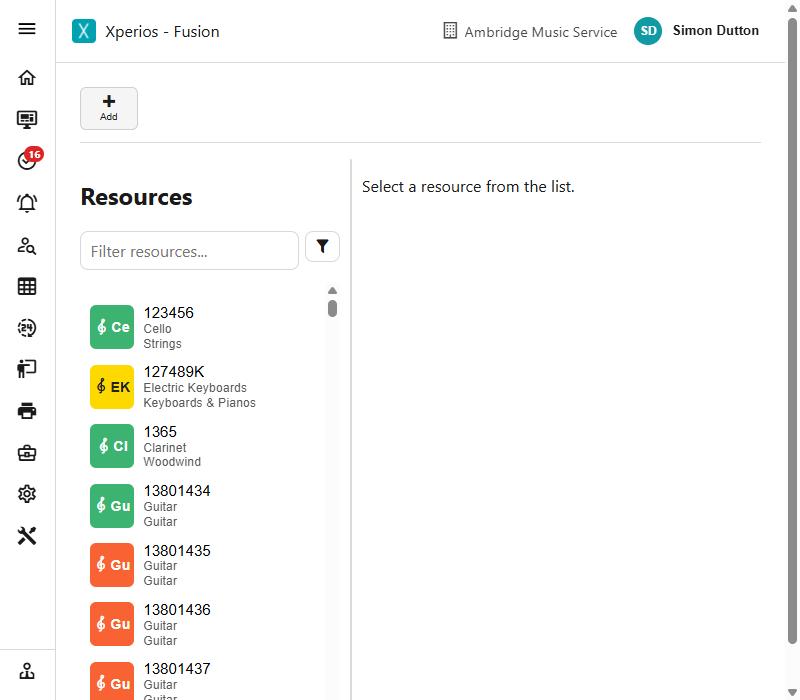
Resources are the instruments and equipment your service owns - what you hold, who has it, and what condition it is in.
Anything in stock can go out on hire, where the borrower is charged, or on loan, where they are not. The hire itself - the offer, the agreement and the charging - lives in Hires; this page is about the instrument.
What a resource is
Each resource has a kind, and the kind decides what else is worth recording. An instrument has a make, a model and a value; a costume or a piece of music does not, so those fields are cleared when you change the kind. A resource never keeps a previous kind's details.
There are seven kinds: Instruments, Equipment, Costumes, Sheet Music, License, Service and Miscellaneous.
Resources are organised by category, group and location, all set up under Settings. Alongside those, a resource carries what you need when something goes wrong or an auditor asks: its supplier, order number and invoice number, its original and current value, its insurance value and reference, when it was last tested, and when it was last stock-taken.
One of a thing, or forty
Most instruments are a single item with its own reference. Some resources are not - forty music stands are one resource with a quantity, and quantity out counts how many of them are currently issued. For those, "out" is a number rather than a yes or no.
Status, and the colour of the tile
A resource's status is where it is in its life:
| Status | What it means |
|---|---|
| Available | In stock, free to be issued |
| In Repair | Away being repaired |
| Disposed | Written off or sold on - kept for the record, not for issuing |
| Assigned to Hire | Out on a charged hire |
| Assigned to Pupil | Out against a lesson or a group membership |
| Assigned to Teacher | Held by a member of staff |
| Assigned to School | Held at a school |
| Assigned to Centre | Held at a centre |
The tile colour on the list follows the status, so a screen full of instruments can be read at a glance. Two pairs share a colour: on hire and with a pupil are drawn alike, and so are with a school and with a centre. If an instrument you believe is on hire looks the same as one with a pupil, that is why - the record itself says which.
Filtering by status
The Status filter offers five choices, and two of them are not what they first look like:
| Filter | What it shows |
|---|---|
| In Stock | Only what is physically with you - status Available |
| Available | Available plus anything held by a teacher or a school |
| Hire | Out on a charged hire |
| In Repair | Away being repaired |
| Disposed | Written off or sold on |
Available is deliberately wider than In Stock. An instrument sitting at a school or in a teacher's car is already where the pupil is, so it counts as available to issue; one in the store room is in stock. If you are looking for something to give a pupil at their school, Available is the list you want. If you are counting what you physically hold, use In Stock.
The status is a consequence, not a field you fill in
You do not set a resource to "Assigned to Pupil". Issuing it sets that; returning it sets it back to Available. If a resource says it is assigned when you believe it is back, the return was never recorded - look at its assignment history rather than correcting the status.
Who has it
A resource can be held by a pupil, a teacher, a school or a centre. Assigning it records who has it from when; de-assigning it records its return.
The holder is the open assignment, not a field on the instrument. Each assignment is a row with a date out and, once it comes back, a date returned. The one with no return date is who has it now; the rest are its history.
Show/Hide Returned Resources switches between what is currently held and the full history.
A pupil never holds an instrument in their own right
A pupil holds a resource through a lesson or a group membership - never on their own. That is why issuing to a pupil asks which lesson or group it is for, and why a pupil with nothing running on the day you choose cannot be given one: "This pupil has no lessons or groups a resource can be issued against on that day." The instrument follows the activity, so when the activity ends there is something to chase the instrument against.
Why an instrument will not assign
This is the most asked question in this part of Xperios, and there are only five answers. The message says which:
- It is in repair, or disposed of. Neither can be issued. Bring it back into stock first.
- Something already holds it. "This resource is currently assigned elsewhere - it must be returned before it can be assigned." One resource, one holder: record the return before issuing it again.
- Only a teacher is offered. Direct assignments are switched off for your service, so instruments reach pupils, schools and centres through a hire rather than by being handed out directly. The setting is Use Resource Direct Assignments, under Settings. Turn it on and the other choices appear.
- The contact is not what you picked. Choosing a school and then naming somebody who is not a school is refused rather than half-saved.
- The pupil has no lesson or group on that date - see above.
Giving it back
Returning records the date it came back, and that date is checked: it cannot be earlier than the day it went out, and it cannot be more than a year ahead. If it is going straight on to a teacher or a school rather than into stock, say which - the return asks.
Issuing several at once
When assigning to a school or centre you can either search the list or use Issue by Reference - type the references straight in, one per line or separated by commas, with a run of consecutive ones given as a range such as TT370-TT401.
That turns handing forty instruments to a school at the start of term into one action.
Adding a delivery of them
A single resource is added on the Resources list like any other record. A whole delivery - forty violins arriving at once - is added by Add Stock in the Hires menu, which makes one resource per reference from a prefix and a running number, each with its own serial number and all sharing the make, model and purchase details.
Repairs, stock takes and disposal
Send to repair takes an instrument out of circulation; it cannot be issued while it is away, and bringing it back makes it available again.
Date last tested and date last stock taken are how you show an instrument has been checked - electrical testing, or simply that somebody has laid eyes on it this year. Both are ordinary fields you can query and report on, so "everything not stock-taken since September" is a list you can produce.
Disposing of a resource records the date and the reason and takes it out of use without deleting it, so instruments you no longer own still account for themselves. A disposal can be reinstated if it was made in error, which clears both the date and the reason and makes the resource available again.
The reasons offered are your own list — see Settings > Resources > Disposal Reasons to add the ones you use.
See also
- Hires - offers, agreements and charging
- Settings > Resources - categories, groups, types and locations
- Add Stock - a batch of new resources into stock at once