
Appearance
Rapport
Issues, marketing and your library. Rapport comes with every Xperios, so these entries are always there — whether you see them depends on your user group and your rights.
Interest Source — where people heard about you. Only shown if Use Interest is on in System Configuration.
Distribution Lists — named groups of contacts to write to, either built from a query and refreshed, or kept by hand. See Distribution Lists below.
Issue Area, Issue Classifications, Issue Severity, Issue Teams — the four lists used to classify a support issue: which part of the product it concerns, what kind it is, how serious, and who deals with it.
Campaigns
Marketing campaigns and the stages they move through.
A campaign is a list of stages, each with a date. The stage somebody has reached is recorded in their journal, alongside the calls and emails — so a campaign's progress is read from the contact history rather than from a separate tally, and whoever speaks to that person next can see where the campaign had got to.
Consent Purposes
The things you ask people's permission for, when you want to market to them.
Each purpose carries the question as it is put to them, a flag marking it as marketing, and a sequence deciding the order they are asked in.
Answers are kept as a record that is added to and never overwritten. Each one keeps the email address it was given against, the channel, who gave it — which is not always the subject, since a parent answers for a child — and a snapshot of the wording as it stood at the time. That snapshot is the point of the design: it lets you show what somebody actually agreed to, rather than what the question says today.
This is about marketing, not the emails that run your service
Consent purposes do not govern the messages sent as part of providing a service — offers, invoices, register reminders, lesson changes. Those go out because somebody has asked you to teach them, and asking permission to send them would make no sense.
What purposes are for is marketing: the bulletin, the campaign, the advert for something new.
Marketing sending is not built yet
You can set purposes up and record answers against them, but there is no marketing send for them to govern yet — so nothing is relying on them at present. Recording them now means the permission is already on file when that function arrives, with the wording people actually saw.
If you need to stop everything going to somebody today, that is Block All Communication on their contact record — which does stop everything, invoices and register reminders included.
Library Items
Documents and media uploaded for teachers and parents to read on the Portal.
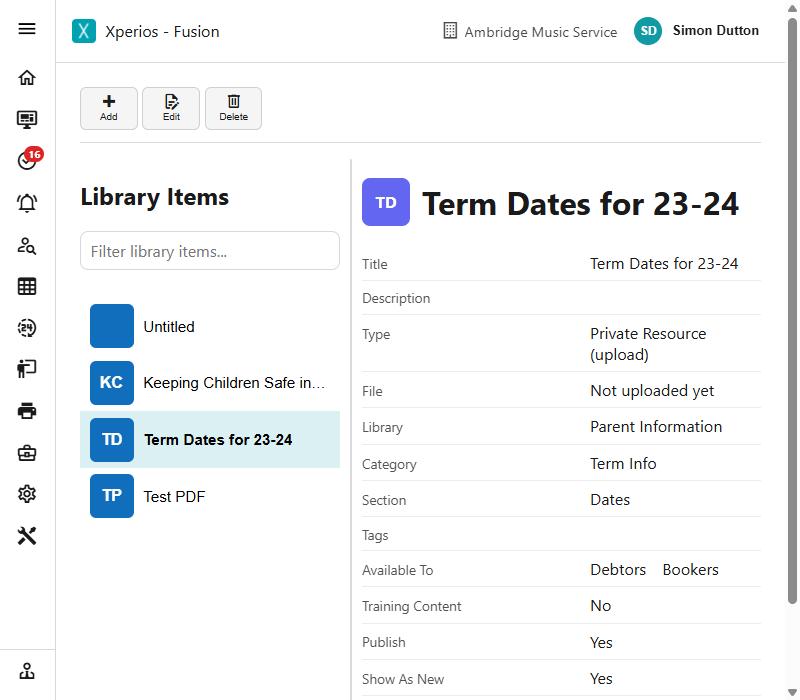
An item has a title and description, a category and section to file it under, tags, and the file or link itself. Several flags decide how it appears:
| Publish | Whether it is visible at all |
| Show As New / Show As Updated | Badges drawing attention to it |
| Available To | Which kinds of contact can see it — debtors, bookers, and so on |
| Training Content | Marks it as training material |
Its type says whether the item is a file you upload or a link to something held elsewhere, and the item is not visible until the file is actually there.
Items can carry a rating, and be shared.
Content Media is the public store: media and documents each given a URL you can copy and use elsewhere, on the Portal or in an email.
Distribution Lists
A distribution list is either Dynamic, where membership comes from a query and is refreshed, or Static, where members are added and removed by hand.
A dynamic list needs the query that produces the members, and which of that query's columns holds the contact. Last Refreshed shows when the membership was last rebuilt.
A query set up as a Distribution List gains Send Mail and Send SMS on its results, which is the point of having one.
Taking the members out to a spreadsheet
Export to Excel, beside Send to list, gives you the members as the screen shows them — the current ones, plus the removed where Show removed members is ticked. Columns: Name, Email, Added, Removed, Blocked and Archived, where Blocked is the contact's Block All Communication.
There is no column choice, deliberately: a list is its members. If you want the figures behind them, run the query the list is built from — that is where the columns live.