
Appearance
How your emails look
Every email Xperios sends is dressed the same way: a header, your colours, a footer with your contact details and social links, and a signature. Where all of that is set has moved, so this page is about which half of the screen you are looking at and why.
Where to find it: Settings > System Configuration > Comms
Two different screens, depending on your brand
The Comms tab shows one of two things, and it decides for itself.
With a brand in Vestarios you get the brand's email parts, laid out as they will be used — and read only, because Vestarios is where they live.
Without one — a service not linked yet, or one on its way out — you keep the older controls, because those are still what its emails use.
You cannot have both
The highlight colours and the header switch disappear as soon as a brand is in use, because the brand replaces them. If a colleague is describing controls you cannot see, one of you has a brand and the other does not.
With a brand: the email parts
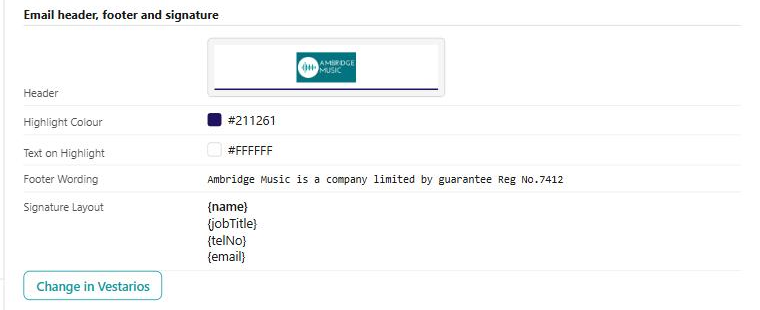
| Part | What it is |
|---|---|
| Header | The image across the top of every email |
| Highlight Colour and Text on Highlight | The colour behind the highlighted parts, and the colour of the writing on it |
| Footer Wording | The words at the foot of every email |
| Phone, Email, Website, Address | The contact details in the footer |
| Social Links | The networks linked from the footer |
| Signature Layout | The lines that sign the email off, in order, with the bold ones bold |
The signature is a layout rather than fixed words: its lines are placeholders like {name}, {jobTitle}, {telNo} and {email}, filled in for whoever the email is from. One layout signs every email in each person's own name.
Change in Vestarios opens them where they can be edited. You land on your own account with the role your Xperios rights give you, so there is no second sign-in to keep track of.
Until the brand is approved, emails use Xperios's header
A brand can exist without its email parts being approved yet, and the screen says so: "Emails use Xperios's standard header until your brand is approved in Vestarios with its email parts."
So a brand that looks finished in Vestarios does not necessarily reach your emails. Approving the email parts is the step that does it.
Without a brand: the older controls
Three settings, and they work as they always did:
- Std Email Template Highlight Colour and Highlight Fore Colour — the same pair as the brand's two colours, set here instead
- Override Standard Email Template Header Photo — a tick box that swaps the standard header image
These are not a lesser version of the brand; they are what an unbranded service's emails genuinely use. They stop mattering the moment a brand is in use.
Who the email comes from
The same tab carries the addresses, and they are worth knowing apart:
- From Email is the address the email appears to come from
- Reply Email is where a reply goes, which need not be the same
- Users Default To Business Email decides whether a member of staff sends as themselves or as the service by default
- Hide Admin Names On Messages keeps your staff's names off what parents and teachers see — they see the organisation instead of the person
A service type can override the From and Reply addresses for its own emails, so a message that came from an unexpected address is usually the service type rather than this screen.
See also
- Brand — the logo, colours and images the email parts belong to
- Connected mail accounts — sending your own email through your own mailbox instead
- An automatic email went wrong, or did not go — when the problem is that it did not arrive rather than how it looked
- System Configuration — every field on the Comms tab, one by one
- Message Content Templates — the wording inside the email, as against the frame around it