
Appearance
DBS and safeguarding records
Every teacher's DBS position in one list, with the dates that say where each check has got to.
Where to find it: Business Management > Teachers > DBS Management
The list reports; the teacher record holds
Nothing is edited here. Every date on this screen lives on the teacher, and the name in each row opens them. The list exists so you can see the whole workforce at once rather than one person at a time.
What the list shows
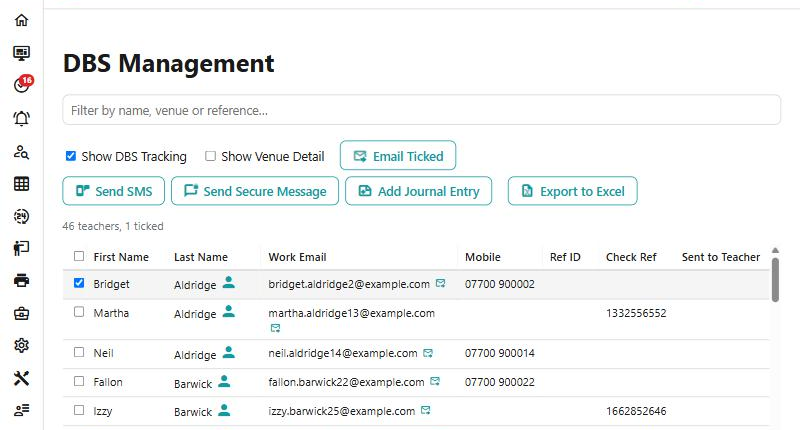
| Column | What it is |
|---|---|
| Ref ID | The teacher's DfE number |
| Check Ref | The reference of the DBS certificate itself |
| Checked | The date the check was done |
| Safeguarding Training | When they last did it |
| Notes | Whatever has been recorded against the check |
Work email and mobile are there too, because the list doubles as the place you chase people from.
Show DBS Tracking
A single tick box adds three more dates, and together they are the whole application:
Sent to Teacher → Form Returned → Check Submitted → Checked.
That is what the tracking tick box is for. Without it you can see who is cleared; with it you can see where everybody else is stuck — forms sent and never returned, forms returned and never submitted.
Nothing here expires
This is worth being plain about, because people assume otherwise: Xperios does not work out a DBS renewal date and does not warn you when one is getting old. There is no expiry column and no reminder. Checked is a date, and judging when it is too old is yours.
The two dates that are expiries — EWC registration and public liability insurance — are on the teacher record rather than on this list.
Show Venue Detail
Normally a teacher appears once. Tick Show Venue Detail and they appear once for each venue they teach at in the academic year you choose — which is how you answer a school asking about the people who come to them.
The year picker only matters with this on; without it the list is everybody, whenever they taught.
Chasing people from the list
The toolbar reaches the people in front of you: Email, Send SMS, Send Secure Message and Add Journal Entry.
The email button tells you who it will reach. With nothing ticked it reads Email All and goes to everybody in the list as filtered; tick some rows and it becomes Email Ticked, with the count beside the list saying how many. The other three need rows ticked before they do anything.
One thing it does quietly and well: one email per teacher, however many venue rows they appear on. Somebody teaching at six schools is chased once.
Export to Excel sends out exactly the columns you are looking at — so if you want the tracking dates in the spreadsheet, turn them on before exporting.
What is on the teacher
The teacher's record carries a DBS & EWC group, and these are the fields the list reads:
- DBS Check, DBS Check Submitted, DBS Reference, DBS Form Sent, DBS Form Returned and DBS Notes
- EWC Registration Expires, and the registration categories
- Safeguarding Training and Safeguarding Notes
- Last Observation, a second observation date, and Observation Notes
- PLI Expires and PLI Notes, for public liability insurance
The EWC categories are hidden until there is an expiry date
The thirteen registration categories — School Teacher, Youth Worker, Work Based Learning Practitioner and the rest — only appear once EWC Registration Expires has a date in it. If you are looking for them and cannot see them, that is why. They are for services registered with the Education Workforce Council, so most services never need them.
See also
- Teachers — the other teacher lists, including pay approval
- A teacher's contract is not right — the contract side of a teacher's record
- Emailing a lot of people at once — the batch mail composer this list opens
- DBS Manifest — what a school sees of the same information on the Portal