
Appearance
Tasks
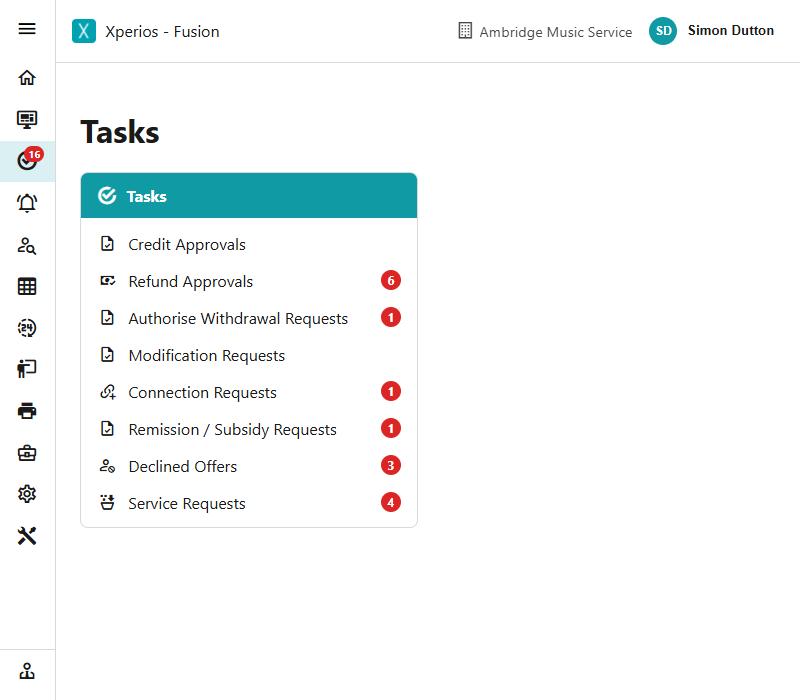
Tasks are the things waiting on somebody in your team — approvals to give, requests to answer. The Tasks menu shows how many of each are outstanding.
What it covers
| Task | What is waiting |
|---|---|
| My Jobs | Your own jobs, set up for you or taken on |
| Credit Approvals | Credits raised and waiting to be authorised |
| Refund Approvals | Refund requests waiting to be authorised |
| Authorise Withdrawal Requests | Withdrawals somebody has asked for, waiting for a decision |
| Modification Requests | Changes a payer has asked for from the Portal |
| Connection Requests | People waiting to be connected to a teacher |
| Remission / Subsidy Requests | Funding claims waiting to be approved or turned down |
| Declined Offers | Offers somebody has turned down, waiting to be dealt with |
| Service Requests | Requests from schools and organisations waiting for an answer |
Each shows a live count, so a glance tells you whether anything needs doing.
Who sees which task
This is the part that generates questions, and the rule is simple: a task appears for somebody whose user group reaches it, and each task has a right of its own.
| Task | The right that shows it |
|---|---|
| My Jobs | None — every user has it |
| Credit Approvals | Authorise Credits |
| Refund Approvals | Authorise Refunds |
| Authorise Withdrawal Requests | Authorise Withdrawals |
| Modification Requests | Authorise Change Requests |
| Connection Requests | Connection Requests |
| Remission / Subsidy Requests | Authorise Remission/Subsidy Requests |
| Declined Offers | Declined Offers |
| Service Requests | Service Requests |
They are all under Actions in a user group.
Read is enough — it does not have to be Execute
A task shows for somebody with either read or execute on its right. So granting read to let a manager keep an eye on a queue also puts the task on their menu, with its count. If you want somebody not to see a queue at all, the right has to be off rather than read-only.
"Why can Jane not see Refund Approvals?"
Almost always her user group, and almost never anything else. Check the one right named above before looking anywhere else — the task is not hidden by licence, by area, or by who raised the item.
The approval lists in Business Management
Some of the same work has a fuller list of its own under Business Management, where the task gives you the queue and the list gives you everything including what has already been decided:
- Remission Requests and Subsidy Requests under Tuition
- Hire Remission/Subsidy Requests under Hires
- Group Member Remission/Subsidy Requests under Group Members
Two menu items, one right
Tuition's remission and subsidy requests were separated into two lists in October 2026, and they still share the single right they had when they were one item. Granting it gives both; withholding it takes both away.
Working through them
Click any of them to open its list and deal with the items there.
The counts are the point
A task is only a task while somebody has not dealt with it. If a count never falls, that is worth knowing about — it usually means nobody has taken ownership of that queue rather than that the work is hard.
See also
- A member of staff cannot get in, or cannot change anything — user groups, rights and licences, and which of them is stopping somebody
- Posting against an invoice — what a credit or refund waiting for approval looks like from the ledger
- Refunds — the refund itself, before and after it is authorised
- Actions on a pupil's activity — the buttons that resolve a withdrawal or modification request