
Appearance
Termly Register
Termly Register shows a whole term of one activity at once — every session across the top, every pupil down the side — and lets you mark the register straight into the grid. It is the quickest way to catch up a term you have fallen behind on, because you never leave the page to do it.
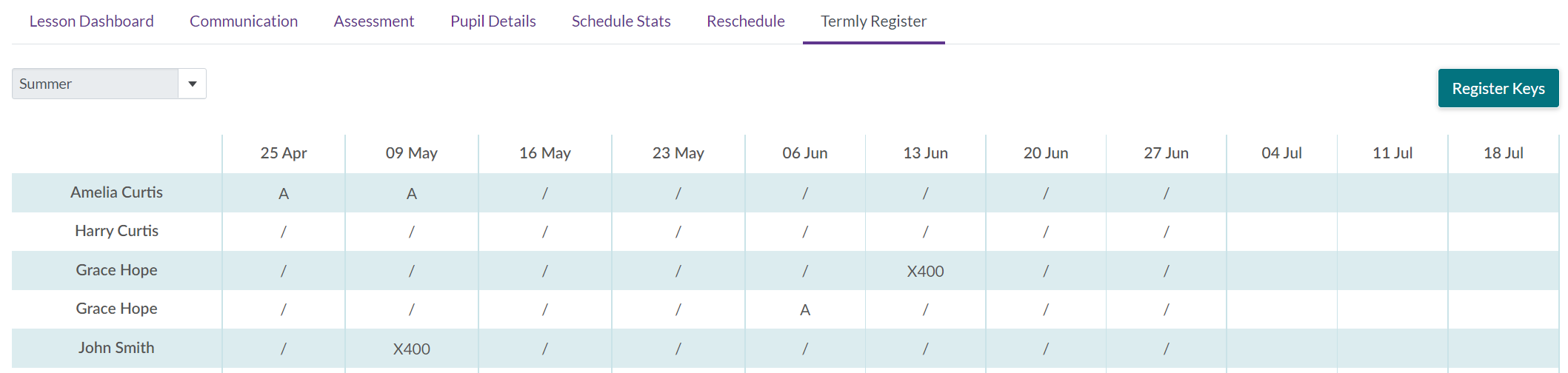
Choose the term from the list at the top left. Register Keys at the top right opens the key, so you can see which character means what in your service.
Reading the grid
There are two heading rows before the pupils start:
- The Result row is each session's task result — whether the lesson was delivered — and it is coloured, so a term's worth of outcomes can be taken in at a glance.
- The row under it names each session.
Then one row per pupil, with their mark in each session's column. A pupil who needs to borrow an instrument carries a small musical note beside their name.
An empty cell is not a missing mark. It means the pupil had already finished by that session, so there was nothing to mark.
Marking from the grid
Click a cell and choose the register key. The mark is saved for that session on its own, so you can work along a row or down a column as suits you.
Some cells cannot be clicked, and it is worth knowing which, because the usual assumption is that something is broken:
| Why it will not take a mark | What it means |
|---|---|
| The activity has not been confirmed | Nothing in it can be marked yet — ask the office |
| The session was paid | It has been through a pay claim and is now a record |
| The session was made up | Mark the make-up instead |
| That pupil's row was credited or made up | They were not charged for it, so there is no attendance to record |
| The cell is empty | The pupil had finished by then |
If somebody else marks it at the same time
Each session is saved against the version you were looking at. If a colleague or the office has marked that session since the grid loaded, your change is refused with the reason and the grid is read again, so you can see what they put before deciding what to do. Nothing is quietly overwritten either way.
A school or organisation looking at this grid sees it read-only. Marking is the teacher's.