
Appearance
Reschedule
Reschedule moves a lesson to a different time, or changes how long it lasts. It is a tab on the lesson page, and it only appears when the lesson can still be moved — see when the tab is missing below.
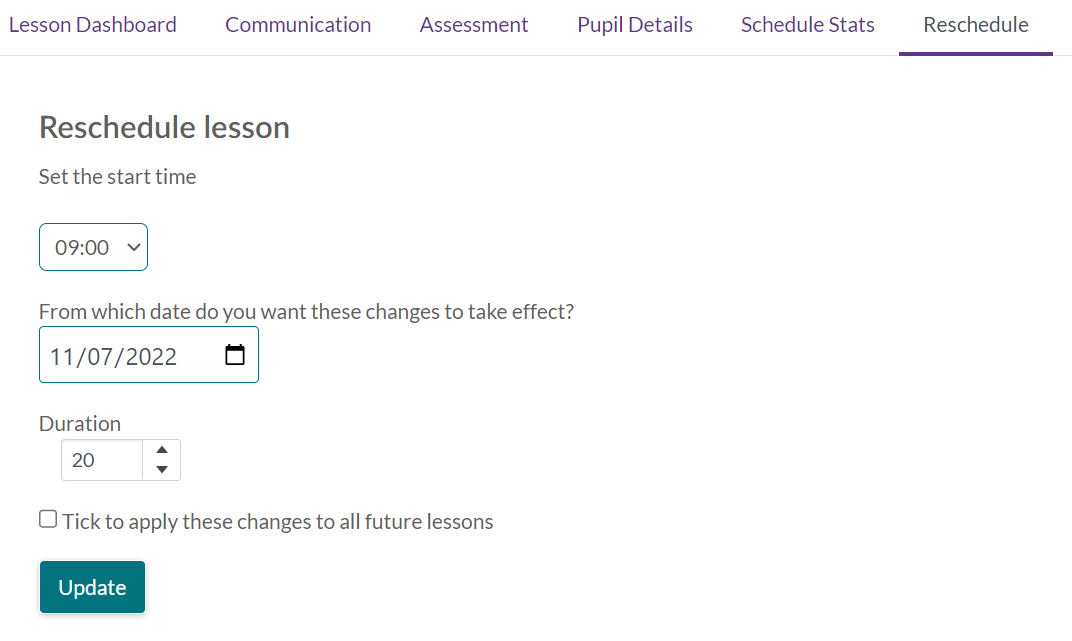
What you change here moves the whole session, not just your own view of it: the venue's booking, every teacher on it and every pupil in it. There is no version of this that moves the lesson for you alone.
What you can change
| Field | Notes |
|---|---|
| Set start time and Set start date | Only where your service lets teachers change the start |
| Break time | Minutes, 0 to 120. Time at the school either side of the lesson, which is not teaching time |
| Duration | Minutes, 10 to 600. Only where your service lets teachers change the length |
| Apply to all following | Moves the rest of the block too — see below |
Break time is offered even where the start and the length are not. It is time you are at the school rather than part of the lesson, so it counts towards your contracted time but never towards the lesson's length or what anybody is charged for it.
How far a lesson can move
This is the part worth knowing before you start, because it is the limit people run into:
- A recurring lesson can only move within its own week, and that week runs Sunday to Saturday. A Monday lesson can go back to the Sunday before it or forward to the Saturday after it, but not into the following week.
- A one-off lesson is freer: it can move anywhere inside its academic year.
If you need a recurring lesson somewhere outside its week, don't fight this tab. Give the lesson a task result that calls for a make-up, then book the make-up on the date you want.
The new time also has to be a time the service teaches. Where the activity is linked to terms it must fall inside a term and outside that term's breaks; otherwise it must fall inside the academic year. Either way it cannot land on a bank holiday or in non-working time. If it does, you are told which of those it is rather than left to guess.
A move into another term keeps up
If the new date falls in a different term, the session moves into that term as well, so the termly register and the term's session count stay right.
Moving the rest of the block
Tick Apply to all following and every later session of the block moves with it — by the same number of days, and to the same time of day. A lesson put back two days and an hour later moves the ones after it two days and an hour later.
Nothing is saved straight away. Update shows you what would happen first: how many sessions will move, and a list of any that will be left as they were, each with its reason:
- it already has an outcome, mark, claim or credit
- it is a make-up
- the new time would be outside the terms, in a term break, outside the academic year, or on a bank holiday or in non-working time
Read that list before you commit — a session left behind is one you will have to deal with another way. Then Confirm to save, or Cancel to go back and change the time.
When the tab is missing
Reschedule is not shown at all when the lesson cannot be moved. That is deliberate rather than a fault:
- The lesson already has a task result. Once it has an outcome it is a record of what happened.
- It is a make-up — move the make-up itself instead.
- It has been paid through a pay claim.
- It is a one-to-one tuition lesson. Those are handled from the Register tab.
- Your service does not let teachers change either the start or the length, so there would be nothing on the tab to change.
A move can also be refused when you save it, with the reason said plainly — most often because a pupil on the lesson already has a mark or a credit.
A school-billed lesson's cost follows its length
Change the duration of a school-billed lesson and the school's cost changes with it, as does the contracted time of any salaried teacher on it. Shortening a lesson is not a cosmetic tidy-up.