
Appearance
My Contracts
My Contracts is where you read and sign your teaching contract. It is there only where your service uses teacher contracts.
Where to find it: Teaching > Teacher Admin > My Contracts
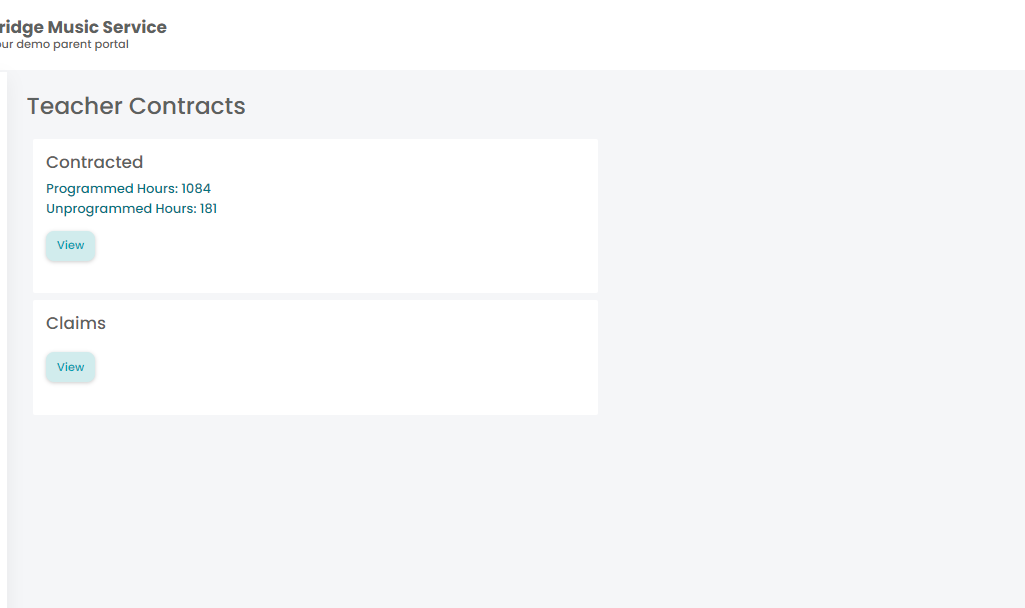
Where a signing period is set, the page tells you what it is. If you arrived here because another page sent you, the heading reads Outstanding Contracts — that is a contract waiting on your signature, and most teaching pages will keep sending you back until it is signed.
What a contract shows
- Its reference, where one is held.
- Programmed Hours and Unprogrammed Hours — the contracted teaching, and the contracted time that is not a timetabled lesson. Neither is shown on a contract paid by claims, because there are no contracted hours to show.
- Variations, if there are any: a line per change with its From and To dates, the lesson affected and the details. This is where a mid-year change to your hours appears.
- View, which opens the contract document.
For the same hours broken down activity by activity, with FTE, use Contract Breakdown.
Signing it
You have to open it before you can sign it
Sign Contract stays disabled until you have used View on that contract, and the page says please review while that is so. It is not a fault — you cannot sign a document you have not opened. If the button looks dead, View first.
Once signed, the contract shows as signed with the date. If it needs signing again — after a variation, for instance — the sign button comes back.
Where a contract has no document attached you are told so. There is then nothing to review, and the office needs to attach one before you can sign.