
Appearance
My Teaching
Signed in as a teacher, you get a Teaching menu of your own, grouped the way the work divides up. Not every group is there for everybody: each depends on the modules your service runs and on what it lets teachers do, so a group you cannot see is one your service does not use.
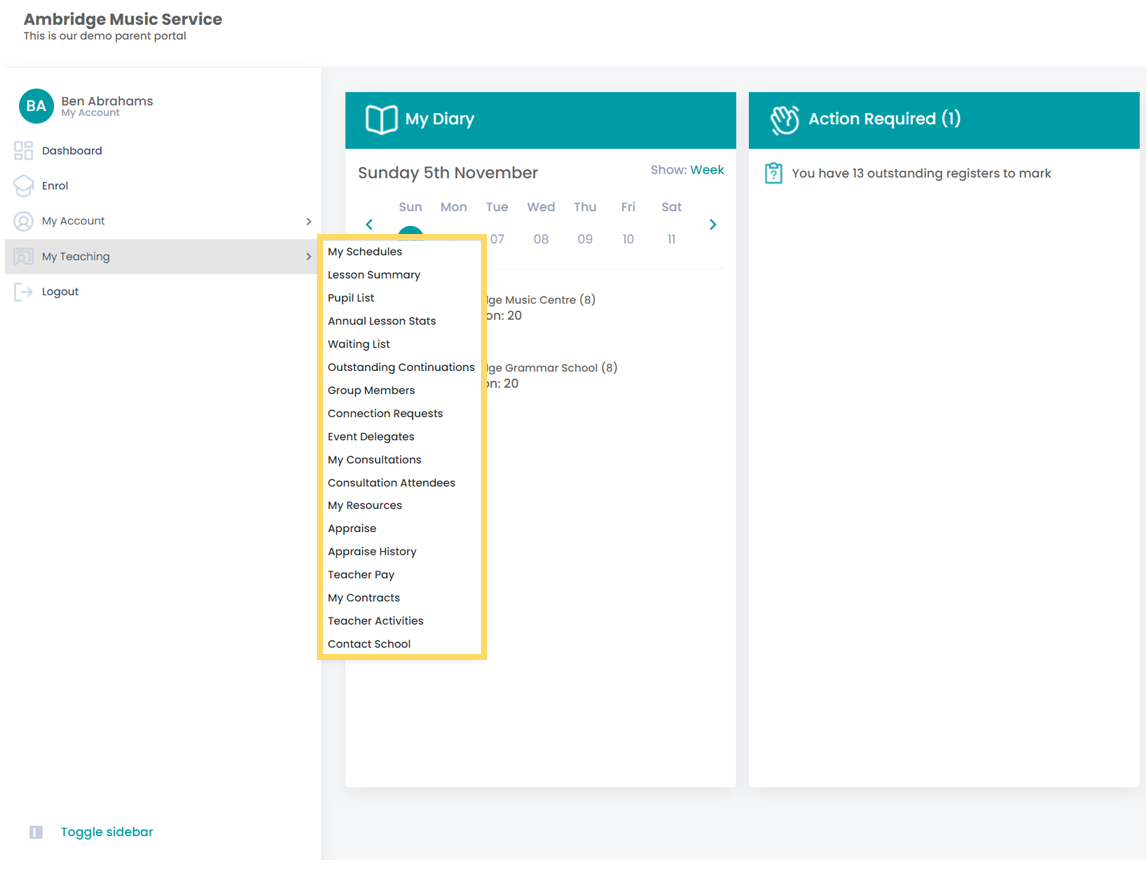
Teaching Schedule is the short way in
A teacher also gets Teaching Schedule on the main menu, outside this one. It opens the same diary as Lesson Managment > Diary below, in one click instead of three, because it is the page teachers open most.
Lesson Managment
Your timetable, and what it adds up to. (The menu spells it that way; it is the group you want.)
| Diary | Your week as a diary. Click a lesson to open it |
| Weekly Summary | The same week as a list, showing what is marked and what is not |
| Timetables | A block's timetable, to view, edit or print |
| Contract Breakdown | The year's hours and FTE against your contract |
| Annual Lesson Stats | Sessions planned, diarised and delivered, by activity |
Not on this menu, but part of the same job: Sessions Require Make Up — every lesson still waiting for a make-up, reached from your dashboard.
Pupil Management
The people rather than the timetable.
| Waiting List | Pupils waiting for a place: consider, offer, reject or pass on |
| Tuition Pupils | Your tuition pupils for a year, with attendance so far |
| Outstanding Continuations | Pupils who have not yet said whether they are carrying on |
| Group Members | Your groups and who is in them |
| Connection Requests | Parents asking to be connected to a pupil you teach |
| Event Delegates | Who is booked onto your events, and their forms |
| Pupil Evaluation | Accept or reject applicants, where your service runs two-tier events |
Consultations
Consultations come with every Xperios. What a teacher sees here still depends on what your service lets teachers do.
| Create Consultation | Add or remove the slots you are offering |
| Consultation Attendees | Who has booked which slot |
| My Consultations | Your own consultations, as a parent |
Resources
My Resources — the stock you hold: where it is, taking it back, releasing it, and claiming what is available. Where your service runs the Resources module.
Appraise
Pupil reports come with every Xperios. What a teacher sees here still depends on what your service lets teachers do.
| Appraise | Write, submit and authorise pupil reports for an open period |
| Appraise History | Periods that have closed |
| Manager Reports | Line managers only: the team's reports, to authorise or send back |
Teacher Admin
Your own record, and your pay.
| Teacher Pay | Your pay claims, where your service lets teachers manage them |
| My Contracts | Read and sign your contract |
| Qualifications | Add or amend your qualifications, where your service allows it |
| Teacher Activities | The activities you can teach, and at what level |
| Contact School | Message a school you teach at |
| Contact Admin | Message the office |
| My Emergency Contact | Who to contact about you in an emergency |
An unsigned contract blocks the rest
Where your service uses teacher contracts and you have one waiting, most teaching pages send you to the contract first. Sign it and they open as normal.