
Appearance
Teaching on a phone
The Teaching menu gathers what the Portal puts under its own Teaching menu. If you use one screen in the app, it is the lesson page — the rest is there so you do not have to go back to a computer.
The lesson page
Opened from Today or the Diary. The register comes first, because that is what you are there for.
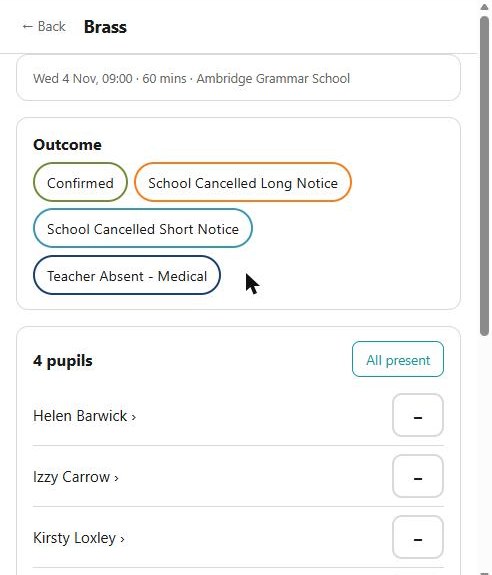
Outcome comes first and sets what the lesson was — confirmed, cancelled by the school at long or short notice, the teacher absent, and whatever else your service records. Then the register itself: every pupil with a mark, and All present to mark the lot in one tap. Where a pupil starts partway through — a staggered group — their own time is shown under their name.
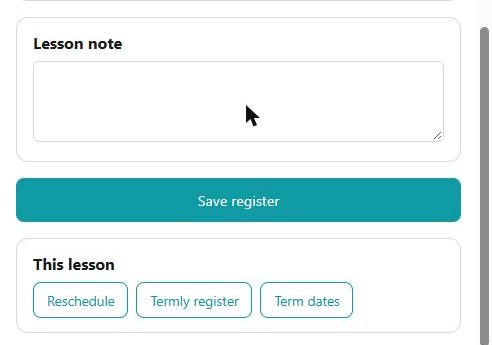
Below the register are a lesson note and Save register. This lesson carries what you can do to the lesson as a whole — reschedule it, open the termly register, and see the block's term dates.
It works with no signal. See working without a signal.
A pupil within the lesson
Tapping a pupil's name opens their page for this lesson, and that is where the rest of it is:
- Their time, teaching group, subject and assessment level, their school year and class, when they started, and the lesson notes and invoice.
- Instruments — giving one out from your stock, taking it back, asking the office for a hire, or withdrawing that request.
- Moving them to another block, finishing them, removing one added by mistake, or asking the office to finish a parent-billed pupil.
- Change time, group or subject, and a link to the pupil's own page.
Asking the office to finish a pupil takes a leaving date, a reason from the list, and Notes for the office — your own words, in your own account of why. The notes are optional, and they are kept with the reason, so the office reads "Moving away (Requested by Teacher): family relocating at Easter" rather than just the reason code. It is worth filling in: a parent-billed pupil is not yours to stop, and what you write is what the office has to go on when they decide.
The Teaching menu
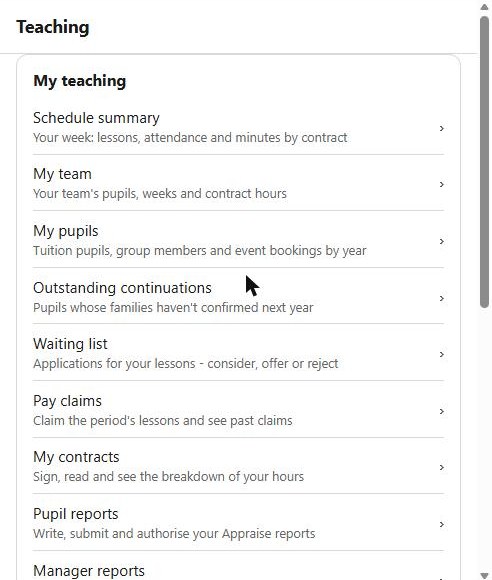
| Schedule summary | Your week: lessons, attendance and minutes by contract |
| My team | Your team's pupils, weeks and contract hours, for line managers |
| My pupils | Tuition pupils, group members and event bookings by year |
| Outstanding continuations | Pupils whose families have not confirmed next year |
| Waiting list | Applications for your lessons — consider, offer or reject |
| Pay claims | Claim the period's lessons, and see past claims |
| My contracts | Sign one, read it, and see the breakdown of your hours |
| Pupil reports | Write, submit and authorise your Appraise reports |
| Manager reports | Your team's reports — authorise, return, send back |
| Consultations | Your sessions, the bookings, and who has booked |
| Annual lesson stats | Sessions diarised and confirmed, by block |
| Contract breakdown | Your hours by activity, and your FTE, for a year |
| Resources | Instruments you hold and those out with your pupils |
| Teacher activities | What you teach, and to what level |
| My teacher details | Your emergency contact and qualifications |
| Contact a school | Write to the people at a school you teach at |
| Contact the office | Write to the office staff |
Entries appear according to what your service runs and what you do: My team and Manager reports only for a line manager, Consultations only where your service runs them, Pupil reports only with Appraise.
The waiting list
Every move the Portal offers: taking somebody on, offering a place with its one-to-one and fast-track checks, giving an application to another teacher, reading medical notes, and messaging the payer. Connection requests and evaluations are reachable from Today when something is waiting on you.
The phone is better than the Portal for one thing in particular
Marking a register in the room, while you can still see who is in front of you. Everything else in this list is a convenience; that one changes whether the register is right.
See also
- Today — what is waiting for you
- Diary and messages
- Working without a signal
- The same ground on the Portal: Teaching