
Appearance
Today
Today is the app's home screen, and the thing that makes it worth having on a phone. It opens on what is happening now rather than on a menu, and it is built for the thirty seconds between arriving somewhere and starting.
You get the panels that apply to you — a teacher who is also a parent sees both sets.
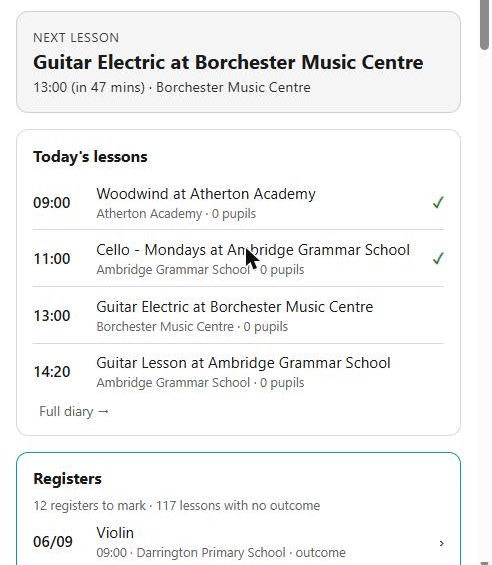
Next lesson
The one at the top, for teachers: where you are going, and when. It changes with the clock, so it tells you which state you are in rather than making you work it out:
| Starting soon | The next lesson is nearly due |
| In lesson | You are in it now |
| Lessons done for today | You have taught them all |
| No lessons today | Nothing scheduled |
Where a lesson has no venue recorded, it says so rather than leaving a blank.
Today's lessons
The day's teaching, in order, each opening its lesson page — which is where the register is.
Registers
Registers still to mark. This is the panel that saves the most time: instead of remembering which lesson you did not finish marking, the phone keeps the list and you work through it. It includes anything you marked without a signal that has since been refused — see working without a signal.
Needs your attention
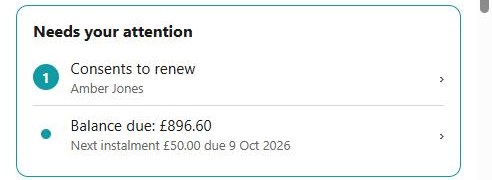
The things waiting on you, gathered in one place rather than spread across screens. Depending on who you are, that can include registers and outcomes to give, make-ups to book, disputed or unconfirmed lessons, connection requests, evaluations, offers to answer, and a progression to confirm for next year.
Each one takes you straight to the screen that deals with it.
This is the panel to trust
If Needs your attention is empty, there is nothing outstanding for you. It is assembled from the same rules the Portal uses for its own dashboard, so it is not a reminder somebody has to maintain — it is what the system knows is waiting.
This week
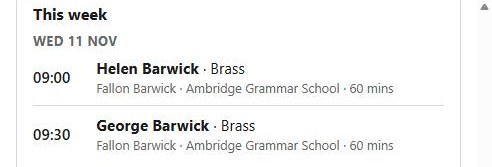
For families: your children's lessons across the week, so you can see what is coming without opening the diary.
Your account
Your balance, with a way to pay where there is something to pay and your service shows families their finances.
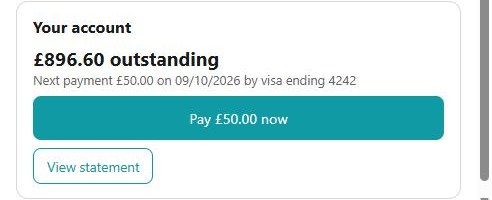
Where a payment plan is running, it names the next instalment, when it is due and which card it will come from. See Family, finance and enrolling.
Also for you
Anything else your service is showing you — notices and adverts it has published.